Wednesday, December 9, 2009

MOSS Governance considerations

Here are some of my key deployment considerations to governance & management.

  • Quota - to encourage storage management, if not manage your disk space and search relevancy
  • Usage Policies - what is ok, SharePoint Designer, Custom web parts, SQL data sources in dataviews, what types of sites do you provision, who can own a site?
  • Data/Site Retention policies - How long does data that isn't accessed or categorized or even used for a couple of years stick around?
  • Web Part/Development policies - Ownership, support, deployment?
  • Meta Data Capture & Content Types - How can you get the best data out of your users?
  • Managed Approach to deployment (top down) - What is our enterprise search story, what is our browse, site map and site directory story... What do the departments in my company use for aggregation?
  • Self Service approach to deployment (bottoms up) - how can I keep Help desk from being a bottleneck to information worker productivity
  • Montoring Plan - Is there a 24/7 plan with a MOM console? What application packs or web services verifications and synthetic transactions for verifiying uptime.
  • Global Considerations - Shared Services, WAN and end user performance levels, enteprise search considerations
  • Cost Model or Charge Back Model for recapture of IT Costs - who pays for all this?
    Solutions Deployment packaging best practices and rules to live by - How can we consistently deploy web parts, site definition changes
  • Branding - how can we consistently have a good experience for our end users and keep the sense of company ownership
  • Stakeholder and ownership - who should be involved in these decisions
  • SSP Delegation models - Who owns Search and relevancy (best bets), who owns the profiles (company directory), who owns the BDC (business data catalog) connections to our SAP, who get's safe locations for Excel published charts, spreadsheets
  • Operational & Service SLAs -
    Backup and Restore/Recovery & Business Continuance SLAs
    Uptime
    Downtime windows
    Performance SLAs
  • Communications plan - who do we communicate to, when and how often and what? Is there a Communications website where we communicate this list of info?
  • End User Education Plan - Is there an FAQ, training materials, brown bags, web sites?

I recommend going through this list, and adding more of your own, then building a governance worksheet or "Green book" that helps bring the stakeholders together.

~ Gangadhar Kotu

Features of MOSS 2010

SharePoint 2010 is the business collaboration platform for the Enterprise and the web that enables you to contact and empower people through an integrated set of rich features. SharePoint 2010 helps you cut costs with a unified infrustructure while allowing you to rapidly respond to business needs.
Features of the new SharePoint 2010
  • New User Interface including the new Ribbon - A streamlined new user interface including the Ribbon is an intuitive and contextual web user interface that makes users more effective. reduces training, provides better performance and lowers cost.
  • Web Edit - Web Edit allows users to easily customize a site, making it possible to respond more quickly than ever to changes in your dynamic business environment.
  • Silverlight Web Part - The Silverlight Web Part allows you to fully integrate Silverlight applications within your SharePoint site for a more interactive user experience.
  • Rich Theming - Combined with Web Edit, rich theming allows you to skin your SharePoint site using your favorite office client themes. Change the colors and fonts to customize just as you like it.
  • Multiple Browser Support - SharePoint 2010 will now support not only MS Internet Explorer, but now FireFox and Safari will also be fully supported.
  • Visio Services - Visio will now be fully supported. You can link diagrams in real time, with high-fidelity in a consistant matter so that everyone can stay up to dat. Even those who do not have Visio.
  • New SharePoint Designer - SharePoint Designer comes with a new User Interface with enhanced modeling capabilities and improved workflows.
  • Business Connectivity Services (The Business Data Catalog) - Business Connectivity Services (BCS) allows you to connect to Line-of-business applications, web services and databases in a user friendly way enabling users to interact and update it easily in both web and office clients.
  • SharePoint Workspace - Formally named Groove, SharePoint Workspace is a rich client for SharePoint that lets you take your SharePoint lists and libraries off-line, including the ability to update content and sync it back when you re-connect.
  • Rich Media Support - Silverlight and PowerPoint presentation capabilities are easily integrated with the new SharePoint 2010. Your information and presentations will come to life in new and dynamic ways with ShjarePoint 2010.

Friday, December 4, 2009

What The World’s Greatest Managers Do Differently

Based on a mammoth research study conducted by the Gallup Organization involving 80,000 managers across different industries, this book explores the challenge of many companies - attaining, keeping and measuring employee satisfaction. Discover how great managers attract, hire, focus, and keep their most talented employees!

Key Ideas:

  1. The best managers reject conventional wisdom.
  2. The best managers treat every employee as an individual.
  3. The best managers never try to fix weaknesses; instead they focus on strengths and talent.
  4. The best managers know they are on stage everyday. They know their people are watching every move they make.
  5. Measuring employee satisfaction is vital information for your investors.
  6. People leave their immediate managers, not the companies they work for.
  7. The best managers are those that build a work environment where the employees answer positively to these 12 Questions:
    1. Do I know what is expected of me at work?
    2. Do I have the materials and equipment I need to do my work right?
    3. At work, do I have the opportunity to do what I do best everyday?
    4. In the last seven days, have I received recognition or praise for doing good work?
    5. Does my supervisor or someone at work seem to care about me as a person?
    6. Is there someone at work who encourages my development?
    7. At work, do my opinions seem to count?
    8. Does the mission/purpose of my company make me feel my job is important?
    9. Are my co-workers committed to doing quality work?
    10. Do I have a best friend at work?
    11. In the last six months, has someone at work talked to me about my progress?
    12. This last year, have I had the opportunity at work to learn and grow?
The Gallup study showed that those companies that reflected positive responses to the 12 questions profited more, were more productive as business units, retained more employees per year, and satisfied more customers.

Without satisfying an employee’s basic needs first, a manager can never expect the employee to give stellar performance. The basic needs are: knowing what is expected of the employee at work, giving her the equipment and support to do her work right, and answering her basic questions of self-worth and self-esteem by giving praise for good work and caring about her development as a person.

The great manager mantra is don’t try to put in what was left out; instead draw out what was left in. You must hire for talent, and hone that talent into outstanding performance.

More wisdom in a nutshell from First, Break All the Rules:
  1. Know what can be taught, and what requires a natural talent.
  2. Set the right outcomes, not steps.
  3. Standardize the end but not the means. As long as the means are within the company’s legal boundaries and industry standards, let the employee use his own style to deliver the result or outcome you want.
  4. Motivate by focusing on strengths, not weaknesses.
  5. Casting is important, if an employee is not performing at excellence, maybe she is not cast in the right role.
  6. Every role is noble, respect it enough to hire for talent to match.
  7. A manager must excel in the art of the interview. See if the candidate’s recurring patterns of behavior match the role he is to fulfill.
  8. Ask open-ended questions and let him talk. Listen for specifics.
  9. Find ways to measure, count, and reward outcomes.
  10. Spend time with your best people. Give constant feedback. If you can’t spend an hour every quarter talking to an employee, then you shouldn’t be a manager.
  11. There are many ways of alleviating a problem or non-talent. Devise a support system, find a complementary partner for him, or an alternative role.
  12. Do not promote someone until he reaches his level of incompetence; simply offer bigger rewards within the same range of his work. It is better to have an excellent highly paid waitress or bartender on your team than promote him or her to a poor starting-level bar manager.
  13. Some homework to do: Study the best managers in the company and revise training to incorporate what they know. Send your talented people to learn new skills or knowledge.
  14. Change recruiting practices to hire for talent, revise employee job descriptions and qualifications.

~ Gangadhar Kotu

Wednesday, October 28, 2009

Ways of Appreciation

Any form of appreciation makes a person happy and valued. It gives the impression that the employee is efficient and thus deserves some form of acknowledgement. Appreciation does not wait for time or occasion. Whenever the employee delivers commendable work, a small act of appreciation can be a great boost to their morale.

The most common form of appreciation is through gifts or increments. Gifts like chocolates or something that interests the particular employee can be bequeathed. Cash prizes or coupons can be awarded so that the employee gets some extra income. No matter how small the gift is, it can be the biggest motivating factor.

An appreciation letter can be an asset for any employee. It leverages the career prospects of the employee. It portrays that the employee was very good at his/her task and thus can be regarded as a worthy employee.

A simplistic way of appreciating is saying thank you or praising their efforts. As the employee has contributed whole heartedly for the organization, expressing gratitude for the same makes the employee keep up the good work. Also their names can be displayed on notice boards as performers of the month or week.

If a team effort needs to be appreciated, the whole team can be taken out for a pleasure trip or a small feast. Acknowledging them with claps in front of the whole workforce reinforces their spirit. It also instigates others to perform and receive the same commendation.

An efficacious employee longs to receive opportunities to flourish in his/her trade. Training such employees to be better will guarantee fruition to both the company and the employee.

Every employee requires to be appreciated and the medium of appreciation can vary or can be developed. What is important is that the employees receive his/her due as it can make them feel esteemed and execute quality work.

~ Gangadhar Kotu

Saturday, October 17, 2009

Trip to Kurnool flood victims

Today morning, I had booked the tickets to Kurnool and return too. My bus would start by 9PM from Majestic, Bangalore. We had already purchased the items to be distributed to flood victims near by Kurnool.

** I had spent my Diwali time with flood victims in Kurnool areas by distributing some of the needy items. **

17-Oct-2009 7:15 PM Started from my home to Majestic, the bus took more than an hour. At the end the bus was not moving from Majestic theatre. So took a chance to walk down to Majestic bus stand.
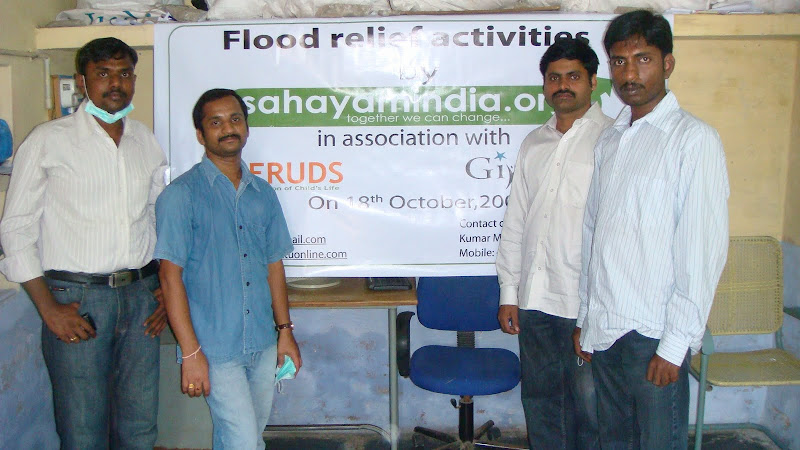
17-Oct-2009 8:35 PM I had met the friends Kumar (Actually Kumar is started a new trust called 'SahayamIndia' to service the public, where ever he can) and Mohan there. So the trip started with the efforts of Kumar only. God bless you Kumar.
17-Oct-2009 9:10 PM Actual Journey has been started and probably by 11PM, the bus has been stopped for dinner and had hot hot Roti and Veg curry at Chikka Ballapur area.
18-Oct 2009 6:00 AM got down at Kurnool and doesn't feel like some flood came there and went to Hotel S.V.Regency (for fresh up). While going to hotel through Auto, we were noticed the mud marks on the walls. We were inquired Auto driver (didn't ask his name) about the situation. He was explaining us like "there are areas where the water has come till mid of third floor". We met Mr. Mallikarjun (NGO, from SERUDS, Kurnool) at Hotel and asked us to get ready by 8:00 AM - 8:30 AM. Other friend (Murali) also joined us by 7:15 AM.
18-Oct 2009 8:50 AM, Had a good and nice break fast at Hotel Amaravathi deluxe, which quite opposite to Hotel S.V.Regency.

Post break-fast, we were going by Auto to SERUDS office and kind of struck in traffic jam (also traffic police was present). The traffic jam was because of about more than 50 tractors (>50) were lined up at Agricultural Market Committee Yard. I had inquire with Auto driver (Mr. Reddy) and got to know that they are clearing up all the mud piled up in the yard up to 2 feet.

Yes, we had reached SERUDS office (Location Budhavara Peta)
SERUDS and below is the team namely Kumar Mukkala (Founder of Sahayam India), Gangadhar Kotu, Mohan Vayyala, Muralidhar Reddy. The house almost dried up but no roofAlso checked the stock of items (200kgs of Rice, 100 kgs of Dal, 100 litres of Refined Sunflower Oil, 200 bath soaps, 200 washing soaps).

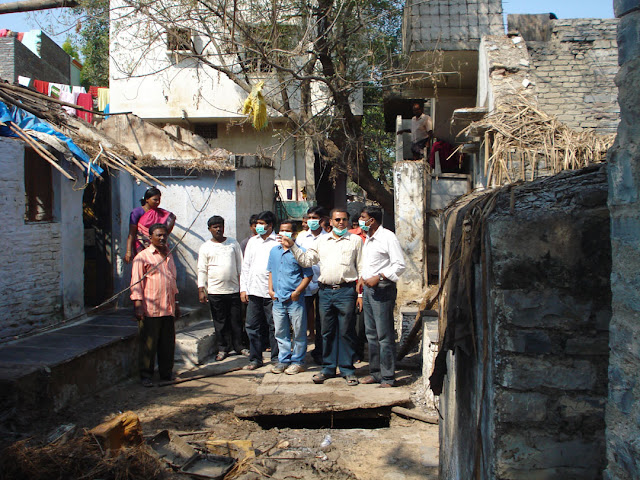
After 15-20 mins, we wore masks as going to all flood effected areas as a precaution. We have started the camp from here. The following is the map of what areas we had visited.
******* Map image
a. Have been to Mala giri and met the people there. Understood that they have lost everything and some of the houses are not in a position to enter in. Power was still an issue in the houses here. They are getting power only during the day time and no power during night times as the house walls are still wet.
NGO explaining the situation to our Team


b. Have been to Madhiga giri and met the people there. Here there is no big loss to the houses as almost all are buildings.
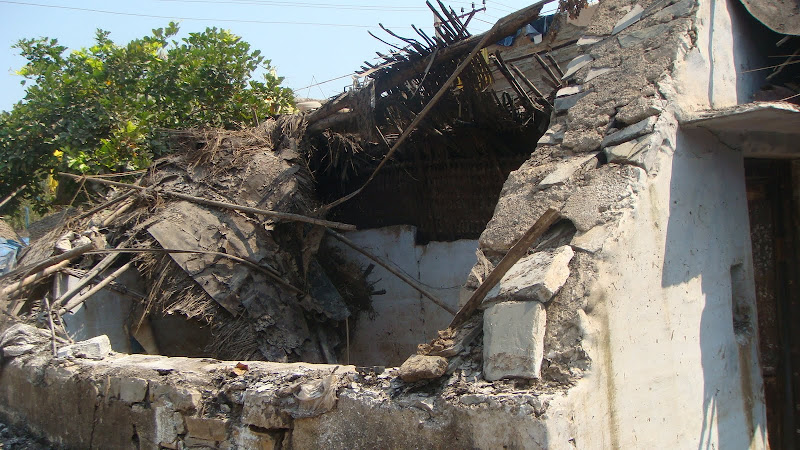
The house almost dried up but no roof
The areas a &b got flooded with water almost 35-40 feets height and people used small boats to go to the better places. In both the areas the people are daily wages couple of days back. But now, they are workless, homeless, foodless and even hopeless for some days as no one are visiting them and giving a hope. No govt officials are visiting them.
c. Have been to One town and people are still showing the flood marking points.
The house almost dried up but no roof
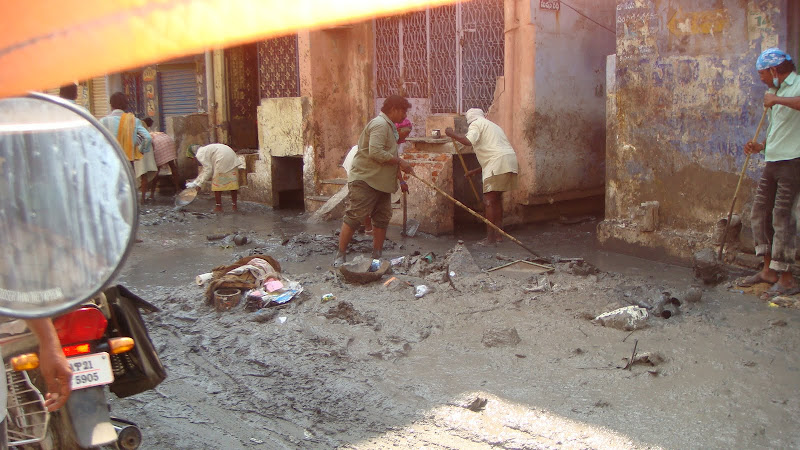
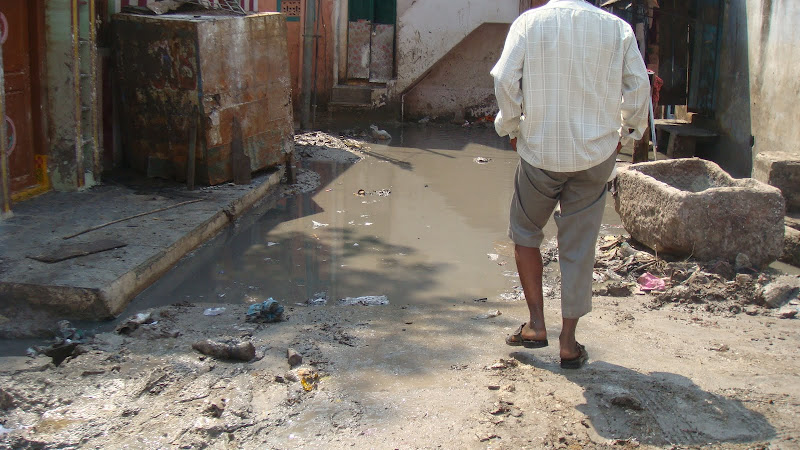
d. Have been to Kummara veedhi and observed that the Muncipal employees are now trying to clear off the mud from the places. In some of the streets, water was still there which was not even floating. We were observed that they are still cleaning up the bowls (which still had mud...). The area got flooded with water almost 20-25 feets height.
Mud in the placesStill water in the roadsCleaning up the bowls
e. While going towards to Jammi Chettu centre, we have observed that the school was complely with the mud and no one is clearing them. A small picture was taken there and also can be observed the car, books (including Khuran) left unattended.
Muslim SchoolThe house almost dried up but no roofMuslim booksCar in the mud
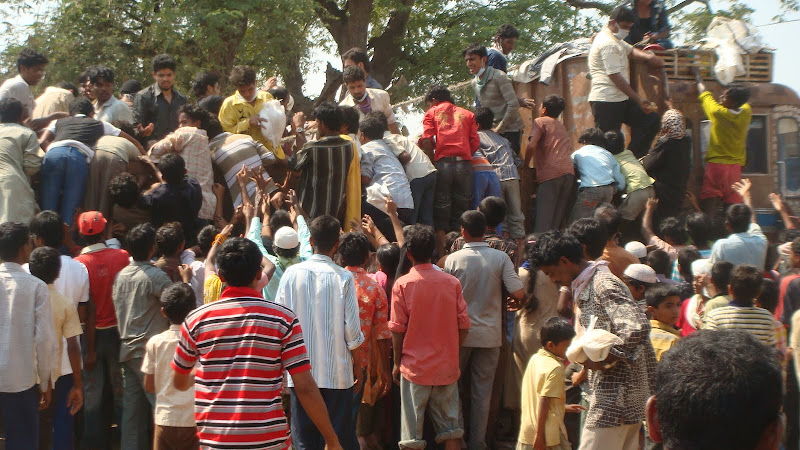
We just move forward to see how the Tungabadra and Handri rivers were sweeped off the areas. While on the way, my god, it was horrible, we were seeing in TV channels only but upfront here. There was a lorry of goods to be distributed and people are rounded around the lorry and rised up their hands to catch which ever can hold. And the people in the lorry are throwing items (rice, dal, water, ashirwad atta,....) over the air. Somebody are getting them because they are jump and catch them. Some of the goods are ground touched and there are people to even get them.
The house almost dried up but no roofThe house almost dried up but no roof
The following click would give you a real-time feel, who is even trying to get those ground touched food grains.
The house almost dried up but no roof
There was some worse here, somebody scolding her not to pick that grains. But how does the others knows what kind of hungry they are in. Heart touching .. huh?
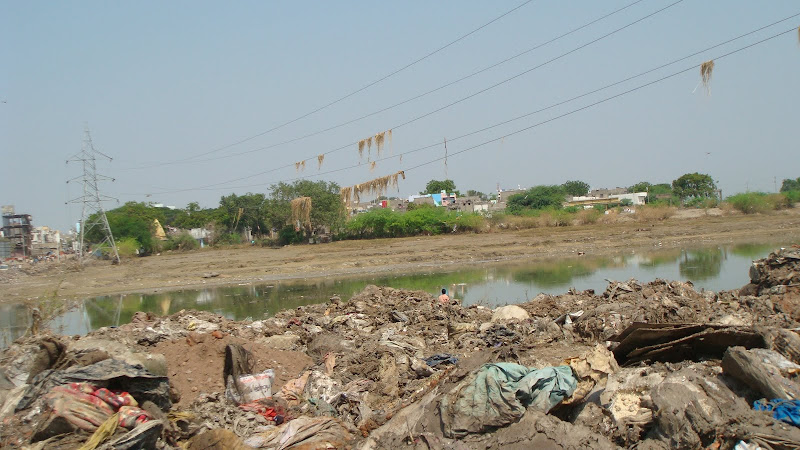
The following picture shows you what was the level of flood in the river area. You can observe the dry rice leaves (వరి చెత్త) are hanging to the power lines (main grid lines).
The house almost dried up but no roof
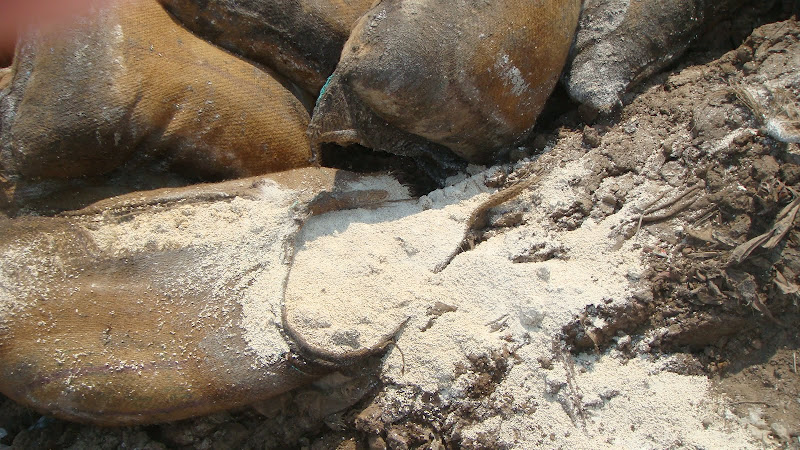
You can also observe there are lots of rice bags (wet in flood water) which got wasted during the time.
The house almost dried up but no roof
The following is the cinema hall in that area.
The house almost dried up but no roof
While moving towards Adarsh Nagar/ near by Chanakya puri, I felt like more thirsty and drunk water. We went to Adarsh Nagar (earlier it was posh area) and understood that almost all the houses are getting vacated and moved to other areas even though less affected with the flood (kind of 8feets height). Luckily because of Dasara holidays, the Montissori School was closed otherwise there would have been a big issue to almost 3000 students.

By now, almost the visiting camp was done and back to SERUDS office. We were started packing the items to be distributed. I felt here like the items would not be sufficient for the people. But we were tried our best to serve atleast to some of the people.

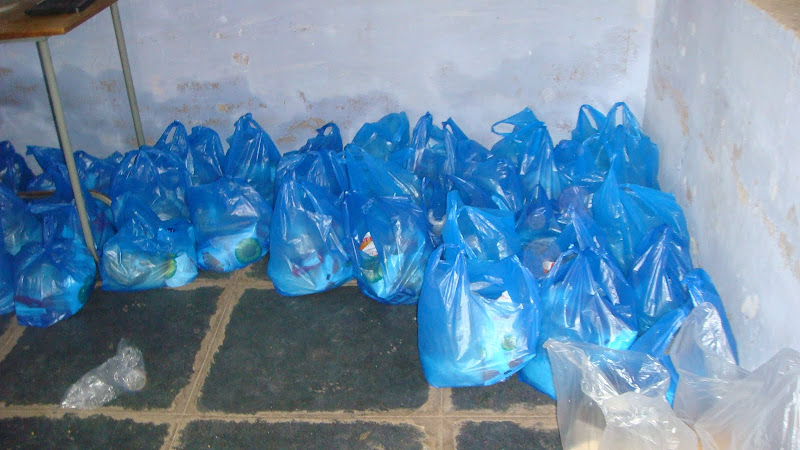
We were actually planned to help 100 people and also distributed the tokens to the people. And were involved in packing the items to each. The items in each packet are 2kg of Rice, 1kg of Dal, 1litre of Refined Sunflower Oil, 2 bath soaps and 2 washing soaps.
The house almost dried up but no roof
Once the packing was done, we all went to Hotel Meenakshi and had nice lunch there.
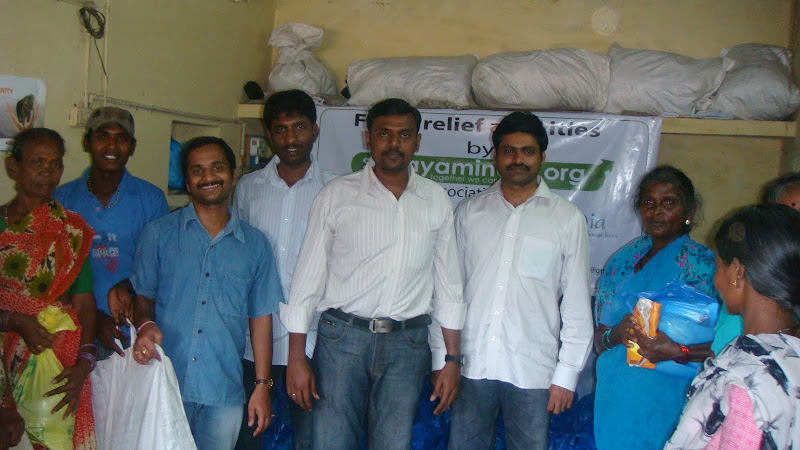
By the time, we were back to office, there are almost 35-40 people are waiting for us in the sunny area. We just took rest for a minute or two and started distributed the packets. Going on fine.. Rajesh is clicking us here..
The house almost dried up but no roof
One woman came who doesn't have a token (means, she is not from the selected area but affected one), so had asked her to wait for sometime by saying "we would give you if anything left". She was scolding, cursing like why don't you select us (people living after the graveyard area; seems to be no one is going that area) also as we also lost everything. Kind of telugu version of the cursings [అయ్యా, మేము సమాధుల అవతల ఉంటాము. మమ్మల్ని ఒక్కడన్నా పట్టించుకోని చావడం లేదు. కనీసం మీరైనా పట్టించుకోండి. ఏఁ మీరైనా పట్టించుకోని చావచ్చు కదా! మాకు ఇవ్వకుండా మీరేమి బాగు పడతారులే? ]
People are coming.. and collecting, ....... coming.. coming & collecting .... ....

In between, there were other 5 women (inlcuding old aged [75-80] beggar) of same kind who doesn't have tokens. We sent 2 of them returned to get the tokens. We were sure that we could really give them but like to wait till all the token holders are collected. But they were not even ready to wait till that time. I personally convinced them to wait for sometime, ofcourse the other woman was waiting since 90 mins to 120 mins time, she had rised up like anything.. you will be destroyed, not get anything... OH MY GOD.. lots of cursings even for the good work (మీరు బాగుపడరు, మీరు నాశనమై పోతారు, ...). We understood her angryness, hunger feel and not to consider her cursings but helped our best with other victims.
4:30 PM, There was no point of waiting for other token holders and given 4 packets to these non-token holders. Still 4 more packets are pending for distribution. We had asked Akshay (attender) to distribute them to other token holders.
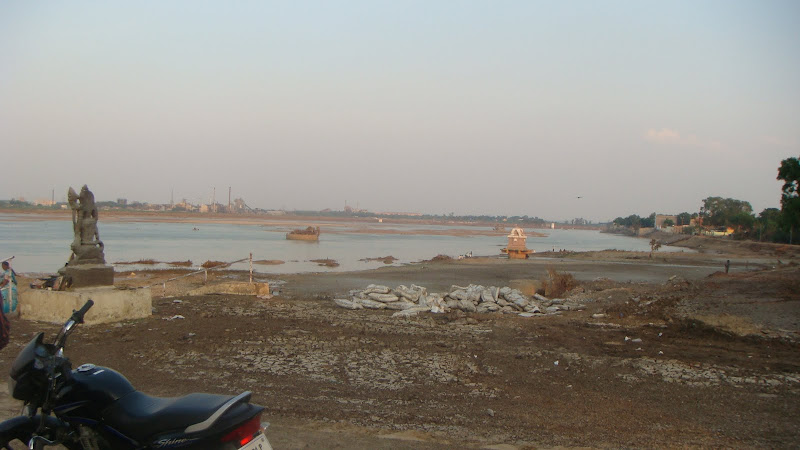
4:40 PM, Left from office to Konda Reddy Buruju (the fort from '' movie), Right behind, there was a Police Parade ground (below picture), which was completely gone with the flood.
Police Parade grounds, SP Office
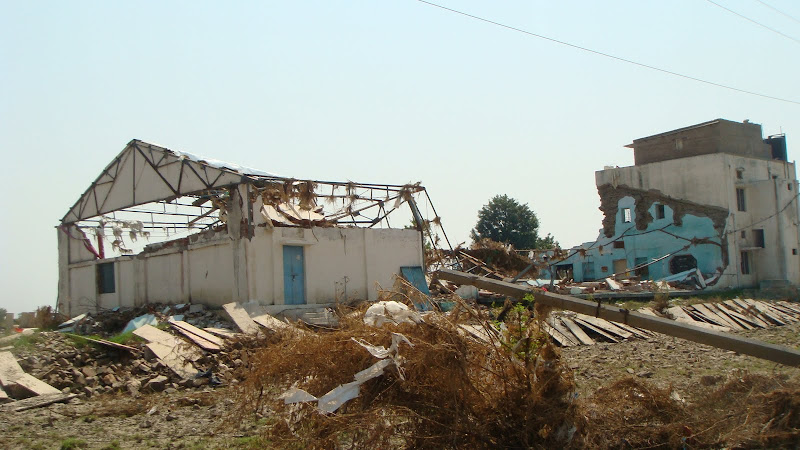
5:10 PM, Went to Tungabadra river. The house almost dried up but no roofThe house almost dried up but no roofCross by, we also a look at ex MLA 'T.G.Venkatesh' house. It was not a house but a modernized fort. It was just on the bank of the river. Even his whole house was filled with flood water. If you see the area outside his house, all are occupied with thick mud of almost 3/4 feet height, which was still unattended and disgusting smell.
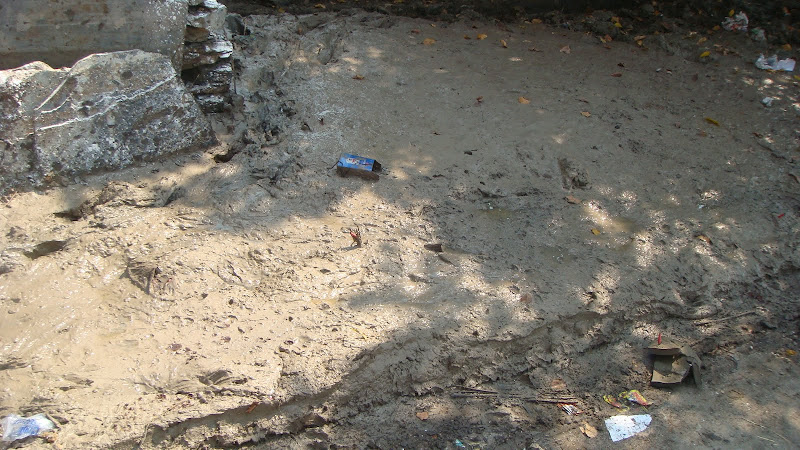
I was always being involved in a Public Relation matters (not only here, I did the same when I went to Kakinada fisher men place to distribute general medicine to them in Mar'2005). I was more happy to directly meet the victims and help them with my hands.
I am also in the plans of starting a charitable trust (the name would be "Sanjit Ram Kotu Charitable Trust") to help the poor people, old age people, ....

Happy Service. Serve the needy people. !!

~ Gangadhar Kotu

Tuesday, September 29, 2009

SharePoint Disaster Recovery

It’s Sunday night, and you just got an urgent call from the office: Your Microsoft SharePoint server is down. After some investigation, you find that the disk array in your only front-end web server is dead. You groan, wishing that you'd implemented a complete farm backup from within SharePoint. However, all is not lost. You know that SharePoint stores all its content in a separate SQL Server machine, and that server is fine. You spring into action, trying to get the environment back up before Monday morning. You ask yourself, What steps do I take? What settings will I lose? Will I get any sleep tonight?
This article will answer these questions and more. The recovery I discuss is based on the two-server farm I've mentioned, but the principles also apply to larger farms. The first (crashed) server is running all your SharePoint services (or roles), and the second server is a dedicated SQL Server system. For the purposes of this article, I'm assuming that you're running Microsoft Office SharePoint Server (MOSS) 2007, but most will also apply to Windows SharePoint Services (WSS). I also assume you’re using Windows authentication and Active Directory (AD). Of course, your environment is likely to vary in some way, so these steps won't be applicable to all situations. Toward the end of the article, I’ll also provide you with some recovery recommendations that you can use today to better protect your SharePoint investment.

Recovery Overview

SharePoint stores all content and most of its configuration in SQL Server databases. However, some configuration settings are stored only in Microsoft IIS and various web.config files. Custom code is often stored within the 12 Root (by default, C:\Program Files\Common Files\Microsoft Shared\web server extensions\12) or the global assembly cache. As you’ll see, performing only a SQL Server backup isn't enough to ensure a smooth farm recovery. Perhaps the most significant drawback is that even with many configuration settings stored in a configuration database, this is not recoverable without a SharePoint-based farm backup. (To learn more about SharePoint farm backups, see "Back up a farm by using built-in tools " at technet.microsoft.com/en-us/library/cc263298.aspx.) Nonetheless, you still have recovery options, so let’s start by reviewing what you'll need.

Assess Your Inventory

Let’s review the items you’ll need to proceed with your recovery. Here are the primary items you should identify:

  • You’ll need all your content databases (not including the one for central administration), your Shared Services Provider (SSP) service database, and your search database. All other databases will be re-created.
  • Identify your web applications and the settings that were in use. This should include your portal web application(s), your SSP web application, and your MySites web application, if applicable. Ensure that you know which content database(s) each web application was using. This is a critical reason why basic documentation for your SharePoint environment is so important. If you don’t know or have this, try to remember and document as much as you can; during the recovery, you might experience some trial and error to fit everything back together.
  • Determine your farm's build version, which will tell you what service packs or other updates that have been applied. To get this information when your farm is down, open a query window on your SQL Server system. In the SharePoint config database, run a Select * From Versions command. In the results window, look for the highest value in the version column. Common build numbers are 12.0.0.4518 Original release (RTM), 12.0.0.6219 SP1, 12.0.0.6318 Infrastructure Update, and 12.0.0.6421 SP2.
  • Identify the SharePoint domain service accounts and passwords that were in use. If you’re uncertain what accounts you have, you can obtain them from your SQL Server system's Logins folder. (Note that you might have other login accounts in addition to SharePoint, and you’ll also need to specify which account is used for which service.) If you don’t know the passwords, you can reset them in AD. Here are the domain accounts and a naming convention I often use: setup/admin account (MOSS.Admin); server farm account, aka the database access account (MOSS.Farm); application pool accounts (MOSS.PortalAppPool, MOSS.SSPAppPool); SSP Service account (MOSS.SSPService); Farm Search Service account (MOSS.Search); and Crawler account (MOSS.Crawler).
  • Identify the SharePoint domain service accounts and passwords that were in use. If you’re uncertain what accounts you have, you can obtain them from your SQL Server system's Logins folder. (Note that you might have other login accounts in addition to SharePoint, and you’ll also need to specify which account is used for which service.) If you don’t know the passwords, you can reset them in AD. Here are the domain accounts and a naming convention I often use: setup/admin account (MOSS.Admin); server farm account, aka the database access account (MOSS.Farm); application pool accounts (MOSS.PortalAppPool, MOSS.SSPAppPool); SSP Service account (MOSS.SSPService); Farm Search Service account (MOSS.Search); and Crawler account (MOSS.Crawler).
    Identify any third-party applications and SharePoint Solutions (.wsp files) that will need to be reinstalled.
  • Identify the new physical or virtual server that you'll use as your front-end web server.
  • Ensure that you have your MOSS installation media and license key.

Recovery Steps

Now that you’ve made an inventory of all the necessary components, let’s proceed with the suggested recovery steps. (When you're entering the service accounts in the steps below, I recommend that you precede the accounts with the domain name—for example: domain\MOSS.Farm.)

  1. Install the original OS version on your new server, and don’t be tempted to upgrade the OS at this point. It’s technically possible but adds another level of complexity to your recovery effort. Keep all other settings (e.g., server name, IP address) the same, if possible.
  2. Add the MOSS.Admin account to the local administrators group on the new server. Make sure this account also has logon permissions to your SQL Server system and is a member of the Sysadmin server role.
  3. Remove the previous computer account from AD, join the new server to the domain, and reboot.
  4. Install IIS.
  5. Install the same .NET Framework version that you had on the previous server. At a minimum, this would be version 3.0. If you don’t know, install the latest version, which is version 3.5 SP1, as of this writing.
  6. Install MOSS. Start by logging on as your administrative account (MOSS.Admin). Run the MOSS setup program from your installation media. As with all SharePoint installations, the recommendation is to use the Advanced and then Complete options. These options give you the most flexibility, letting you have this SharePoint server run any roles needed (e.g., Web Application, search) You can install a slipstreamed version provided it isn’t newer than the build you had previously.
  7. Before creating the farm, install all updates to match your previous build version. When doing this, make sure you apply the individual WSS update first and the MOSS update second. For example, to get to build 6318, install in this sequence: WSS SP1, MOSS SP1, WSS Infrastructure Update, MOSS Infrastructure Update. After each update, the SharePoint Products and Technologies Configuration Wizard will start. When it does, simply cancel it.
  8. Once you've applied the updates, you’re ready to create the server farm. Start by launching the SharePoint Products and Technologies Configuration Wizard, which you can access in the Microsoft Office Server group on the Start menu. When prompted, create a new server farm. Next, specify the name of your SQL Server system and the name of your SharePoint config database. If you're using the same database name that you used in your old farm, you must delete the old database first. For the username, enter the name of your server farm account (MOSS.Farm). Click Next, then enter the desired port for the Central Administration Web application and set the proper form of authentication (i.e., NTLM or Kerberos). When you see the summary screen, review it and click Next to create the farm.
  9. Start the Search service. After the farm is created, the Central Administration web site should automatically appear. If the system prompts you to log on, use your MOSS.Admin credentials. To start the search service, first go to the Operations tab and choose Services on server. In the list of services, click Start next to Office SharePoint Server Search. In the resulting dialog box, select both check boxes at the top to make the server an index and query server. For the Farm Search Service Account, enter the appropriate account (e.g. MOSS.Search).
  10. Start any additional services that are in use, such as Excel Calculation Services. For MOSS, you might not need the WSS Search service because it’s used only to index the Help collection.
  11. Re-create each of your Web applications. You’ll need to do this for your SSP Web application, your MySites Web application (if applicable), and each additional Web application that your farm was using. For each one, follow these steps: Go to the Application Management tab, choose Create or extend Web application, then select Create a new Web application. Enter the port and host header. In most cases, you can keep the path as the default. If this web application was using SSL, specify that here. Enter the application pool credentials. In most cases, each web application should use a separate application pool with unique credentials. For example, for the SSP web application, you would use a logon such as MOSS.SSPAppPool. Finally, and most important, enter the name of your SQL Server system and one of the content databases used for this web application. SharePoint will recreate this website in IIS, register it in the new config database, and link it to your existing content database. If you previously extended any of your Web applications (e.g., configured an intranet for extranet access), you should reapply this now.
  12. Associate remaining content databases with your web applications. This step is necessary only if you have multiple content databases for your web applications. Go to the Application Management tab, access Content databases, and select Add a content database. Ensure that you've selected the correct web application at the top, then specify each additional database name.
  13. Restore your SSP. In navigation menu on the left inside Central Administration, click Shared Services Administration, then Restore SSP. For SSP Name, enter in the name of your SSP such as SharedServices1. For Web application, select the Web application that you just created for your SSP. If you were using a separate Web application for My Sites, clear the use existing location check box. If you get warnings here, just acknowledge them and then select the Web application used for My Sites. Next, enter in the SSP Service Credentials (e.g. MOSS.SSPService). Enter in the name of the SSP Database and then the name of the Search Database. Finally, set the desired folder for the index file location. This should be on a drive letter that has plenty of space, so the C: default is not usually a good choice.
  14. Reset IIS. The easiest way to do so is to click Start, Run, and type iisreset.
  15. Reinstall any third-party applications or SharePoint Solutions. These can include custom IFilters (e.g., to index PDF files), custom web parts, and so on. For more information about SharePoint Solutions, see the "Solutions Overview" at msdn.microsoft.com/en-us/library/aa543214.aspx.
  16. Apply any additional configurations. This is the most problematic area because SharePoint changes might occur in a number of ways. Here are some common areas where you might need to make modifications: alternate access mappings (AAM), web.config changes to your web applications, code deployed to bin folders or global assembly cache, IIS settings (e.g., reloading and binding your SSL certificate), changes to 12 Root (e.g., Features or Site Definitions), web application policy settings, and incoming/outgoing email—in general, anything on the Operations tab in Central Administration.
  17. Issue a full crawl of all your content sources, which will recreate SharePoint’s search index. Because your index files were lost on the old server, you must re-crawl. Within your newly restored SSP, click Search settings, then Content sources and crawl schedules. For each content source, select Start Full Crawl from the context menu. Depending on the amount of content, the full crawl can take from minutes to days to complete.
  18. Last, but definitely not least, fully test your SharePoint websites to validate your work. Errors could range from minor web-part problems on pages to full sites not displaying at all. The cause of errors is most likely configuration settings or missing files.

Recommendations

As you can see, not having a SharePoint-specific backup makes the recovery process much more painful, and you run the real risk of ending up with one or more inoperable components. Here are some recommendations that can mitigate this risk and ensure that your recovery is quick and easy.

  • Perform regular SharePoint-specific farm backups. You can do this manually through Central Administration (on the Operations tab, select Perform a backup) or by using the stsadm.exe command-line utility. One advantage to stsadm.exe is that you create a Windows scheduled task to run on a recurring basis. Here's the basic syntax for a full farm backup using stsadm.exe: stsadm -o backup -directory -backupmethod full
  • You must run this command from one of your SharePoint servers, preferably running as your SharePoint admin account. Also, the service account running the MSSQLServer service on your SQL Server system must have Modify permissions to this UNC share and the underlying NTFS folder.
  • Because a farm backup doesn’t include everything, you should also back up your inetpub\wwwroot folders, your 12 Root folder hierarchy, and IIS (for Windows Server 2003, use iisback.vbs; for Windows Server 2008, use appcmd.exe.)
  • For more powerful and granular recovery options, consider third-party backup software such as AvePoint's DocAve, a popular and respected app.
  • When you upgrade the farm (e.g., install SP2), perform a farm backup before and after the upgrade. Creating a backup following an upgrade is recommended because you'll now be at a newer build and previous backups are more difficult to restore.
  • Maintain a configuration change log. This can be a simple document that describes the updates that were made to the farm—for example, upgrading to SP2, installing a custom application, or manually changing a web.config setting. For obvious reasons, don't store this file in SharePoint.
  • For environments that can’t afford downtime, you should build a recovery farm and configure it through step 7 above. (For more information about building a recovery farm, see "Create a recovery farm" at technet.microsoft.com/en-us/library/cc288425.aspx.) Doing so will speed up the recovery. Also, consider an additional web front end and cluster or mirror SQL Server to add additional fault tolerance to your farm. Incidentally, SharePoint is supported in a virtual environment, and it’s common to have a recovery farm in either VMware or Hyper-V.
  • Perform trial restores to your test/recovery farm. Doing so will ensure that your backups are working and that you know how to perform a restore. You really don’t want to learn how to perform a recovery during a disaster on a Sunday night.
  • When deploying custom code to your farm, use SharePoint Solutions. SharePoint Solutions are the best way to deploy custom updates to your farm. If your organization has a development team that is building SharePoint software, insist that they also create a solution package to deploy it.
  • Keep your content databases small. The larger your content databases are, the longer they will take to restore. In general, I recommend keeping each content database under 200GB.
  • Use an intuitive naming convention for your databases. As you can see, you might need to map your content databases to your web applications. Using a naming convention will make that much easier.

Earn Some Rest We've now walked through a SharePoint recovery using only SQL Server databases. Remember that you won’t be able to recover all your configuration settings; however, now that you understand how this kind of recovery works, you should be able to get your farm online within a few hours. Knowing the limitations of a database-only recovery should encourage you to consider additional backup options, along with my other recommendations. Only then can you be sure to get home in time to get some sleep.

Source is here. Happy hours...!!!

~ Gangadhar Kotu (గంగాధర్ కోటు)

Monday, September 28, 2009

Sri Sri Ravi Shankar Ashram trip

With a short notice from friend, I had been to Sri Sri Ravi Shankar Ashram with my friend's car. Today, seems to be lots of rush inside the ashram. Also noticed that there are various religions from India and devotees (Yoga students) are from other countries too.

As I noticed there, everything is commercial and too costly since the Yoga practice to buy anything. But not sure why? Is this a damn good business going on?

Seems to be Sri Sri foundation is going to start a new university in Orissa called 'Sri Sri Ravi Shankar University' by 2010. I asked them like "What is the qualification required to join this university? Does this require Graduation or Post Graduation?" What kind of answers do you expect from them? Wow..... ..... Are you thinking now on this???????

Here are the answers
  • You can do either Graduation or Post Graduation from this University. But this university will be opened in Orissa by 2010.
  • We don't have any brochures on this.
  • Give us some contacts where they can help in contributing funds.
  • Give us any contact who can rise the funds.
I was like surprised to hear the answers from them. I have no word from then when they are stressing on the last two points.

I went to this Ashram almost like 4 years ago. When I had been there last time, there were very less shopping (just underneath the Vishala Mandir). But now, everything is there including any fancy item, ......bags, shirts, trousers, ..........., handicrafts, ... tiffin, snaks, ice creams,... juice, tender coconut,.................... cyber cafe,................. ATMs,............... choultry........ Travel agencies (taxis, bus facility, airlines booking....). What a facility there?

By all, I don't think this is just an Ashram but a great resort. :(

To add this, I donno what to say, but Sri Sri Ravi Shankar came for a visit (in a car) with tight security on to the one round trip of Ashram road (inside) by 5:45 PM. I was expecting him to have a walk by him in the same path. In spite of that he came by car and just went like that even though lots of people are waiting to see him. I doubt everybody can see him during that time.

Well, as he is a Guru of Yoga and Art of Living, if he would have walk down on the path, people would have followed him and he would have become an example (role model) to not to use the vehicles inside the campus and also it would have been a message (No pollution, exercise and relief) to everybody. What happens to his teach (ethics) to everybody in the world.

I feel Sri Sri Ravi Shankar can serve lots of free or at least low price things to the public.

Finally something for free in Ashram is you can have free lunch/dinner. :)

By all means, my understanding that Art of Living is of a full commercial purpose.

~ Gangadhar Kotu